
Every hour clocked, every rand paid, every employee file in order.
The HR Suite is three apps that work side by side: Time & Attendance records who worked, Payroll pays them correctly and files with SARS, and HR keeps each employee's file from their first day to their last, with an AI HR consultant on call. Start with the one you need most, and add the others when you're ready.
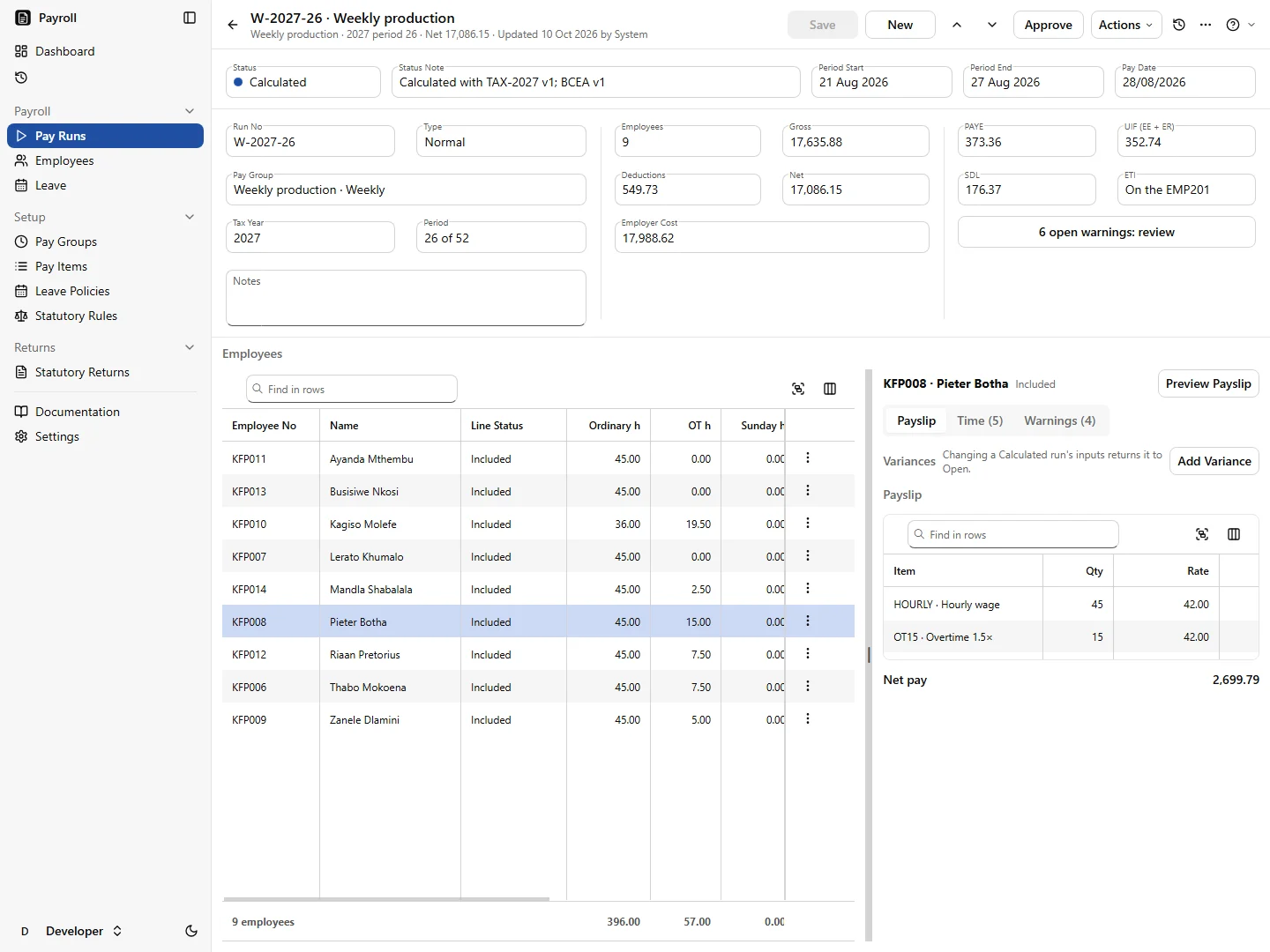
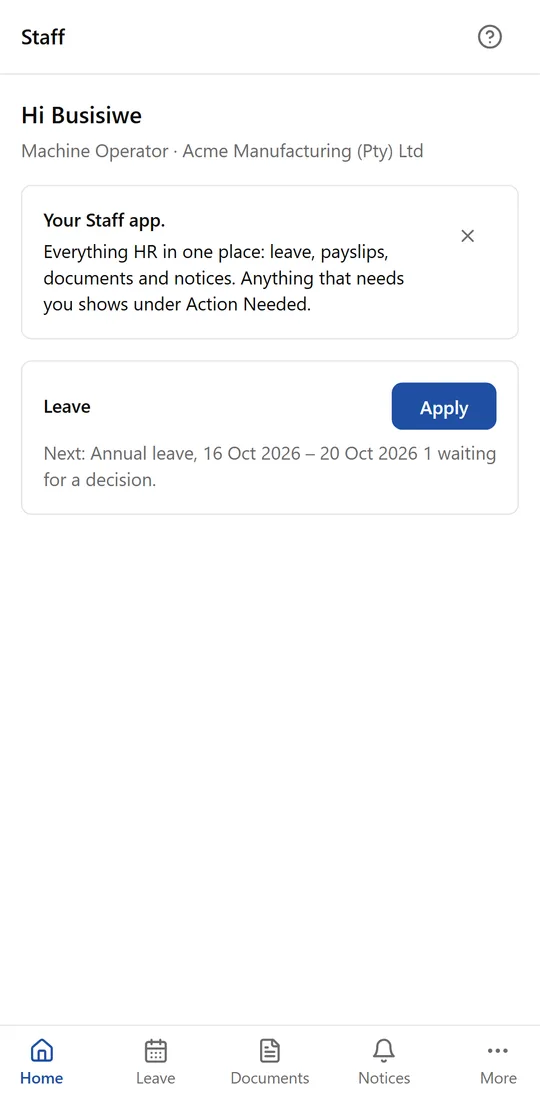
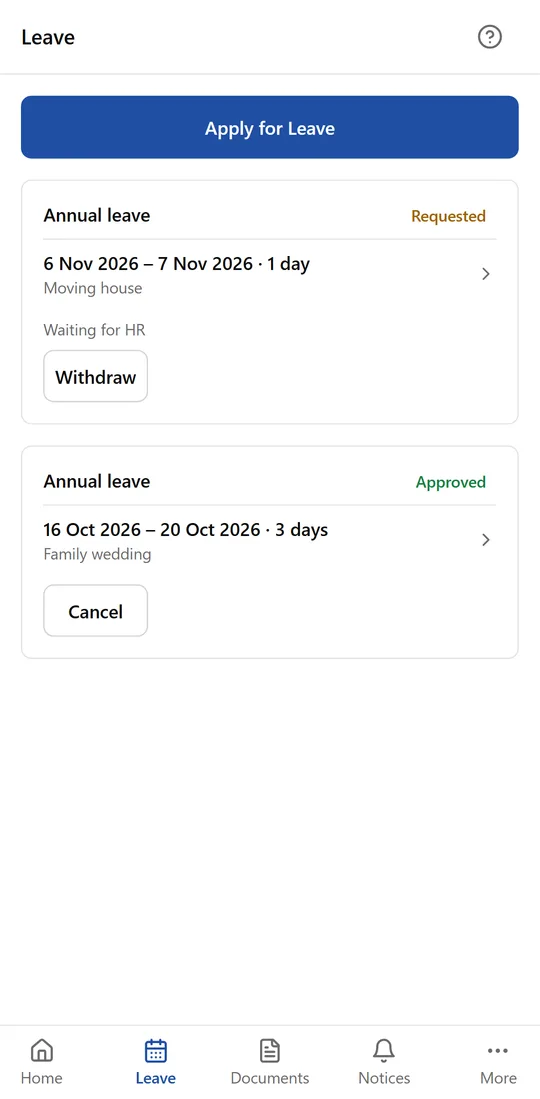
Three apps, one way of working
Each one stands on its own and is priced on its own. Together they cover an employee from the day they start to their last payslip.
Know who's on site, and trust every hour
Clock-ins from ZKTeco and Hikvision terminals, a tablet at the door, or staff's own phones, with exceptions fixed by a supervisor and a reason on record.
- Live Board and muster list
- Phone clocking checked against the site's map area
- Reviewed hours ready for payroll
Pay every hour correctly, and file with SARS
Weekly, weekend-shift and monthly staff in one company, with every pay run checked against the BCEA before anyone is paid.
- PAYE, UIF, SDL and ETI from current SARS rates
- Overtime, Sunday and public-holiday pay by your rules
- EMP201, EMP501 and payslips
Every employee's file, from first day to last
Onboarding, contracts, leave, documents with expiry dates, notices and terminations, and the Staff app on every employee's phone.
- Documents tracked to their expiry date
- Leave requested and approved on the phone
- Terminations with the BCEA notice worked out
- AI advice on discipline and contracts, a skills matrix and SETA training
Start with the one that hurts most. Add the others when you're ready.
Your staff list lives in your BOS database, so the next app starts where the first one left off. Nobody is typed in twice.
Start with Time & Attendance
Clock-ins become reviewed hours, with every change on record. Add Payroll later and the same hours are paid by your rules.
Time & AttendanceStart with Payroll
Correct pay, PAYE, UIF and SDL, and the EMP201 ready on time. Add Time & Attendance for the hours and HR for leave and exits.
PayrollStart with HR
Every employee's file, contract and document in one place, and the Staff app on every phone. Add the others when you're ready.
HRAn HR consultant on call, inside the records you already keep
Most businesses either pay a labour consultant by the hour or find out at the CCMA that a step was missed. HR puts the guidance where the work happens, and you stay in charge of every decision.
- Advise: describe what an employee did and get the steps the 2025 Dismissal Code expects, worded for your own disciplinary code
- Hearing and CCMA pack: tick what to include and get one indexed PDF, in date order, every page numbered
- Review Contract: every clause checked against the BCEA, the LRA and recent case law, with the section behind each finding
- Skills matrix: who can do each job, where one resignation would hurt, and what to train next
Guidance with its sources, not legal advice. Names and ID numbers never reach the AI.
A packer was seen taking two cases of stock through the back gate after his shift. The supervisor saw it and we have the gate camera. He has a written warning for late coming from March.
What this looks like: misconduct, suspected theft. The late-coming warning is for a different offence, so it doesn't count towards this one.
Do today: keep the footage, get the supervisor's written statement, and don't deduct anything from his pay.
Procedure: written allegations, time to prepare, a fellow employee to assist him, and a chairperson who didn't witness it.
Your code: theft is dismissible on a first offence, and your last two theft cases ended in dismissal. Weigh his six years' service and whether he admits it. Your chairperson decides.
Code of Good Practice: Dismissal (2025) · LRA s188
Running your people across three places?
The same four things come up in businesses with shift and site staff.
Hours retyped from the clock into payroll
The clock system exports a file, and someone decides line by line which hours are ordinary, overtime, Sunday or public holiday before typing them into payroll.
The same employee kept in several systems
Payroll has one version of a person, the clock software another, and a filing cabinet the contract, the ID copy and the warning letters.
Documents that expire without anyone noticing
A work permit, a driver's licence or a medical certificate runs out, and it comes up only when someone checks, or doesn't.
Leave on paper, WhatsApp and memory
A leave form on someone's desk, a message to the supervisor, and a balance nobody is sure of until payday.
One staff list, three apps that know their job
The same four, handled.
Hours that come from the clock-ins
Time & Attendance works out hours from each In and its Out and gets them reviewed. Payroll applies the pay rules you set once, and imports clock times from any clock system's file today, with a direct link to Time & Attendance on the way.
One staff list, kept in your BOS database
All three apps add and update staff in your QuickEasy BOS database, the way BOS itself does, so there's one list of who works for you. Each app keeps only its own facts beside it.
Expiry dates that warn you first
HR tracks every document type that expires, reminds the employee and HR before the date, and shows what has run out on the Home screen.
Leave requested on the phone, approved in one place
Employees ask for leave in the Staff app, their manager approves it, and the sick-note rules of the BCEA are checked as they go. Approved leave is listed for the payroll administrator to capture.
On every employee's phone, with no password to forget
HR sends a link; the employee opens it and creates a passkey, unlocked by their phone's own fingerprint, face or PIN. Nothing to install from an app store, and nothing about their fingerprint or face is sent to us.
- Request leave and see where it stands
- Upload documents with the phone's camera
- Read and acknowledge notices
- Ask HR to change their details
Payslips and attendance join the Staff app as Payroll and Time & Attendance are connected to it.
Built for South Africa
The BCEA, checked as you work
Payroll flags overtime caps, rest periods and the minimum wage before you pay. HR works out the section 37 notice period and keeps the certificate of service. Time & Attendance keeps clock-ins the way the Act asks.
SARS rates that stay current
Tax tables, UIF, SDL and ETI are kept as dated rule sets with their official source, and the EMP201 and EMP501 are prepared from your finalised pay runs.
POPIA by design
Special personal information such as medical and employment-equity details is encrypted and seen only by people with the right to see it, and every look at it is recorded. Fingerprints and faces stay on the clocks.
Runs next to QuickEasy BOS
Staff are BOS staff, written through BOS's own procedures. Each app also runs on its own, with no other app required.
Simple monthly pricing, per app
A monthly subscription for the software, hosting, upgrades and support, not a large upfront purchase. Pay for the apps you use. Cancel anytime.
- Each app is priced per employee per month
- Take all three and the total is 10% less
R350 a month
per app, for your first 10 employees (HR R450)
+ R30 a month for each employee after that (HR R40)
Priced per employee per month, not per payslip, so weekly staff cost the same as monthly staff.
Book a demoWhat you're actually paying for
Not a licence and a box. Systems that keep running, and people who look after them.
Managed for you
Hosting in South Africa, security patches, upgrades, monitoring and helpdesk support, handled by the same engineers who built the apps.
Help on every screen
A Help button on every screen opens that screen's guide. Ask a question in plain words and get an answer from the documentation. Guided tours show new users around.
Support tickets inside the app
Raise a ticket from the screen you're on. No separate portal, no lost email thread.
Low risk to get started
Answers to what people usually ask before they commit.
“Do we have to take all three?”
No. Each app works on its own and is priced on its own. Start with the one that hurts most and add the others later; your staff list carries across.
“We already run BOS.”
Good: the suite uses your BOS staff list rather than starting another one, and we host and support it.
“Do we need new clocks or a server?”
No. ZKTeco and Hikvision terminals connect over the internet, a standard tablet can be a kiosk, and every app runs in the browser.
“What if it isn't for us?”
No lock-in contract: cancel anytime. There's no large upfront fee to write off.
Built and supported by engineers you can reach
The HR Suite is built and run by Vibe Crafted Software, a focused team of engineers in South Africa. We work directly with the businesses that use it.
See it with your own staff
Tell us how many people, sites and pay frequencies you have. We'll show you how the suite would work for you, and say honestly if it isn't the right fit.